Thursday, 21 February 2013

Difference between CCITT, IEEE and ISO


                                   CCITT, IEEE and ISO are organizations which define standards which are used for working of hardare or software together. These standards define how to communicate through messages between these hardwares. So the two harwares from different vendors works, this is the magic of these standards. The competition between hardware companies become high so the cost of these hardware automatically decreases. As the companies have more competition so they tend to give more and more features to their hardware and give efficient result. For example you can take the example of memory card of mobiles. In earlier days the memory card comes in low capacity of space and low speed also. Nowadays the momory card of mobile comes with high speed and more space with even low price.
CCITT
                                                    CCITT stands for Consultative Committee on International Telegraph and Telephone. CCITT is United Nation Agency. This organization defines standards for telegraph, telephone and data communication. X25 is one the standard of this organization. X25 is used for wide area network communication. The new name of CCITT is International Telecommunication Union(ITU).

CCITT vs IEEE vs ISO
        CCITT vs IEEE vs ISO
IEEE
                                              IEEE is short of Institute of Electrical and Electronics Engineers. IEEE is also used for defining communication protocols. These protocols are used for LAN communication. Example of these protocols are Ethernet, Token bus and token ring.
ISO
                                                 ISO is short of International Standard Organization. It is also used for defining different standards. ISO started in 1926 and it was named as ISO in 1946.
Difference between static, final and abstract class in java

Abstract class

abstract class
Abstract class
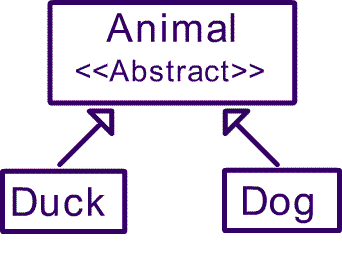
An abstract class is that which must be extended. If you use abstract method in a class then that means the class is abstract also so you have to declare that class as abstract. Abstract class behaves as a template. Abstract class can contain static data. Abstract class can not be instantiated.

Static class

Static class is that whose methods and variables can be called without creating the instance of the class. Static means which is initialized once for example our main method is initialized only once.
We cannot override the static method in child class by non static. So the child class should be static as well.

Final class

Final class is that which cannot be extended and the final variable is constant that means it cannot be changed.

Difference between 4G and 5G mobiles


                                                      4G and 5G are the latest technologies in mobile world. Nowadays more than 6 billion people use mobile in their daily lives. In latest mobile sets we can perform the tasks that we do in our computers. For example we can see pdf files and excel sheets in our mobiles. There are advantages and disadvantages of mobiles. We can talk to people and it saves our huge time then practically meeting the person. Also some mobile sets now offer skype support. With skype if you have high internet speed at your mobile then you can talk to other persons who also have skype installed on their mobile or on computer. Skype usage on mobile saves your money and has good voice quality also. Now blackberry os 6 also supports skype. 
4G vs 5G
4G vs 5G
Now let me explain you 4G vs 5G.
4G
4G has following features:-
  • 4G is started in 2001 or 2002 and now supports 100 Mbit/s speed
  • You can watch YouTube videos on your mobile
  • Skype support
  • Watch TV
  • Video on demand
  • Install VoIP client
  • Face to face meeting if you have camera in your mobile
  • Closer to Gigabit speed
  • Low battery consumption
5G
5G has following features:-
  • High speed than 4G
  • Expected speed in multiple of Gigabit
  • Supports high speed hardware
  • Supports good quality camera up to 10.2 Mega pixels.
  • Time machine
  • Apple has 128 GB minimum storage for 5G
  • In 5G you can charge your mobile battery with solar energy
  • Video conferencing
  • Supports ultra sound technology
5G is under development and is fully functional in 2015.

Why to use jquery instead of javascript


                                              You have already heard about javascript but jquery is little confusing to new coders. The matter of fact is that with the advent of new programming languages it is becoming easier of programmers to code and overcome their needs. Now programmers want that they write less code and have more functionality in the code. With less code in mind, jquery was thought to be created. But first I want to tell you what the heck jquery is. Jquery is also javascript but it is javascript library. That mean some methods are defined in this library that do certain tasks like you want to animate anything then certain method you have to use instead of writing the code from the start.
Jquery vs Javascript
If you have heard about ajax then doing ajax in jquery is very easy. There are many methods in jquery that can do ajax with very little code and is also very easy to undertand the code. Ajax is that data is retrieved or send to other pages while staying on the same page or you can say without page refresh. Now there are many jquery plugins are available which use jquery code at the backend and gives their own task of functionality in it.
You may have heard about different frameworks like codeigniter is php framework which hide many complexity of php code and work in style of writing less code and having more functionality. So jquery is also like a framework which does more and we have to write less code. Javascript is a complex scripting language and doing some tasks become very difficult in it. I had been working on project and was using javascript and the way I want to do something was looking impossible in javascript, so I downloaded jquery library, read some documentation from jquery official website and do some research and finally my work was done and my client also become happy. So hope you also try jquery yourself and you have more fun using it.

Tips to get a job

s you know these are the days of recession. The competition to get a new job is increasing day by day. I am in the field of IT so I can tell you how to get an IT job. But the steps and tips to get other jobs may look same.
How to get a job
How to get a job
Follow the following steps to get your new job:-
  • Read the interview question on the internet of your related field or job.
  • Apply with confidence as confidence is very important.
  • Wear a good dress because that impact well on the interviewer.
  • Give a valid reason about why you are leaving your old job.
  • Tell the interviewer that how you give that company a good success and how you take part in the betterment of company.
  • If you are shy person then don’t tell the interviewer you are shy person and apply with confidence and tell him that you have good communication skills.
  • Don’t tell the interviewer about your home discomforts.
  • Tell that you are a very punctual person.
If you get a job then try to be punctual and don’t leave the office without telling your supervisor. If you want to have leave then give a valid reason. I hope you will get a good job following the points I have discussed.

Difference between notebook, netbook, laptop and tablet

                                     
                                      There are many types of computers exists nowadays and most users also think that smartphone is also a type of computer. Usually people want to buy laptop and there arises question in their mind that which laptop they want to buy notebook, netbook or traditional named laptop.
Tablet
Tablet
So today I discuss about the differences between all these computers.

Notebook

Notebook is also called small laptop. It has no internal dvd drive but can be attached through ports. Notebook is thinner than normal laptop. Its battery runs from 4 to 5 hours. Notebook has maximum 14 inch screen and minimum 12 inch screen. It has Celeron processor. They are costly than normal laptops. If the notebook has touch screen then we call them tablet also.

Netbook

Netbook is smaller than notebook and also lighter in size. The keyboard is very small which make us difficult to type. It consumes less memory and power. Netbook has minimum screen of 7 inch and maximum screen of 10 inch. It is mostly used for internet, visiting website, checking emails and social networking.

Laptop

Normal laptop has large screen e.g. 17 inch screen. It has dvd drive internally build in. Laptop occupies large space. It has 2.5 to 3 hours battery timing. The RAM and other parts can be changed if damaged. Laptop has good quality of audio. Consume less power. It is equipped with intel Centrino processor. With the passage of time the laptops become faster and with lot of space so you can perform all the tasks that you do on desktop pc.

Tablet

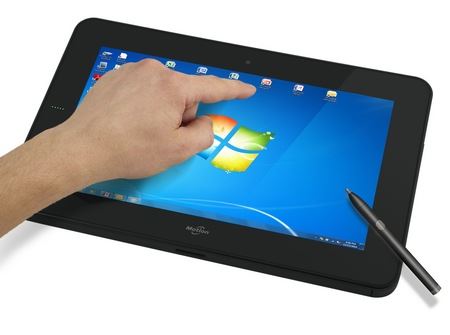
Tablet has no physical keyboard. It has virtual keyboard. Tablet has long battery timing. It can operate by picking it in one hand and using by another hand. It has touch screen. No cd drive and dvd drive. If you want to install something then there are apps available which you can download from app store. As tablets have less space and processor so it can use some network resources connected through internet.
I don’t think so that tablet is very useful for computing. It is used only for playing games, browsing net.

10 Steps to become good android developer

                                              Android operating system is become popular day by day and most of the mobile devices and tablets are now running android. There are many apps already in the Google play which are earning good income. You can also get income from by making free app by placing ads in your apps. Now users are more interested in android supported mobiles because they are of less cost too. Samsung is big partner in android market and it is launching new android mobiles after every few months.
So today I give you steps by which you can become good android developer.
  1. You have to first learn basics of java as android apps are built on java language. Try to make your first hello world app and then move forward.
  2. Learn object oriented programming in java to get better command to make great apps.
  3. Learn android sdk libraries. This is tough part in your learning but if you follow first two steps then you will learn quickly.
  4. Buy some good android books from amazon or from your local book store.
  5. Download android sdk with sdk emulator. You don’t have to buy android smartphone or tablet to test your app. Sdk emulator is used to test your app.
  6. Download eclipse or netbeans. I personally like eclipse.
  7. After you learn the programming and other stuff then try to make your first demo app. This gives you good learning tips.
  8. If you want to launch your app to android market then you have to register yourself as android developer in android market.
  9. Always place your ads in free android app so that you can earn money from.
  10. Don’t ever give up. Work hard and get help from the people already working as android developer.
If you follow the above ten steps then you have no problem in becoming good android developer.

Top 18 google search techniques to get accurate results


                                             We use Google search everyday but we don’t know advanced techniques which we can use to make our search results better and precise. If you use Google search without these techniques then you waste lot of your time in searching and not find what you are looking for.
Advanced Google Search Techniques
So in the remaining text below I give you all the advanced techniques that you can use you make your search better. First open Google.com.
  1. For finding variation of keywords use ~ in front of your keyword.
    For example:  ~ food.
  2. If you put – in front of keyword then it will exclude it from other search terms.
    For example:  Samsung – laptop
  3. For finding the link of websites that point to your site then use link: in front of your site link.
    For example:  link:w3schools.com
  4. Use double quotes around a word or some words and it will give results which contain these words.
    For example:  “mac laptop”
  5. For finding at least one word of your few words in search use OR operator. Note it is case sensitive so keep it in capital.
    For example:  mac OR Samsung OR laptop
  6. If you want to find a website which has related content like your site then use related: in front of your site url.
    For example:  related:w3schools.com
  7. For finding any file containing keywords use filetype:docx after your keyword.
    For example:  computer tips filetype:docx
    You can also change docx to ppt, pdf or zip.
  8. If you want to find url of any website in any other site then use + sign like in example below.
    For example:  “+www.w3schools+com”
  9. Use allintext: to find keyword in the content of page.
    For example:  allintext:Samsung galaxy tablet
  10. If any website is down and you want to find that website cached by Google then use cache:
    For example:  cache:w3schools.com
  11. For finding keyword in title of link use allintitle:
    For example:  allintitle:computer tips
  12. You can also filter keywords in cached site.
    For example:  cache:w3schools.com php
  13. Inurl: is used to find keywords in the url.
    For example:  inurl:php online training
  14. You can also search stock rate of any company by using stocks:
    For example:  stocks:Microsoft
  15. If you want to find the information about any link then use info:
    For example:  info:w3schools.com
  16. If you want to find results of any keywords in only one specific website then use site:
    For example:  tablet site:itrelease.com
  17. For finding definition of word use define:
    For example:  define:computer
  18. If you want to exclude a website from results then use –site:
    For example:  php tutorial –site:w3schools.com
If you follow tips I discussed above then you will save lot of your time in searching. Google is mother of all search engines and knowing these tips will change the way you use it.